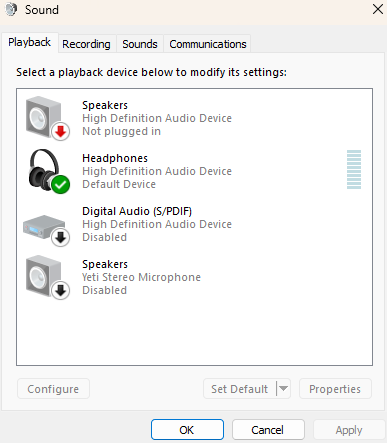
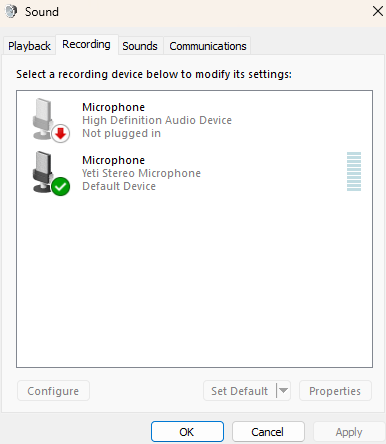
I am currently having an issue where my PC frequently tries to switch to nonexistant default speakers and microphones. This disrupts my usually functional headset audio. As you can see below, I don't have many devices connected and have already made sure the defaults and disableds are correct. I have also checked drivers, uninstalled some possibly superfluous old tech, and edited a registry some folks have a similar problem with. I am happy to answer questions in the comments. Below are screenshots of how the phantom devices look in the fraction-of-a-second they appear before being just as mysteriously removed (sometimes very rapidly for minutes on end). I will bet some more against resolution if this marked is Unranked, otherwise I can just bounty up for a few thousand mana if someone has an answer :)
 1,000
1,000🏅 Top traders
| # | Trader | Total profit |
|---|---|---|
| 1 | Ṁ23 | |
| 2 | Ṁ0 | |
| 3 | Ṁ0 |
stuff to try:
1. check if your front panel audio header is kaput
Shut down the PC.
Unplug power.
Open the case.
Find the case cable labeled HD_AUDIO plugged into the motherboard.
Unplug it.
Boot Windows and test.
if it stops its case front audio jack or HD_AUDIO cable is kaput. if not try
2. disabling the onboard audio in your BIOS
3. get the motherboard vendor specific official audio driver instead of generic microsoft one
4. check usb power management if your headset is usb
Open Device Manager
Expand Universal Serial Bus controllers
For each USB Root Hub / Generic USB Hub:
Right-click → Properties
Power Management
Uncheck Allow the computer to turn off this device to save power
Open Control Panel
Power Options
Your plan → Change advanced power settings
USB settings
USB selective suspend setting
Set to Disabled
@prismatic I've done most of this, and shortly after making the market I switched headphones and had 2+ days of no discernable problems. I'm now pretty sus of the top of tower sound jack, which unfortunately is not easily replaced!